
Could you list every item in your kitchen junk drawer from memory if your house vanished tonight? Most homeowners can’t, and that’s exactly what insurance adjusters count on. When a disaster strikes, the burden of proof is on you. It’s overwhelming to document a 4-bedroom home while you’re in shock. You need a home inventory app that works faster than your memory. Your memory will fail, but high-speed video documentation won’t. You’ve spent years building your life; don’t let an adjuster’s spreadsheet erase it in minutes.
We understand that the manual process feels impossible. We’re here to help you protect what you own and recover what you lose. This guide shows you how to transform your smartphone into a high-speed insurance recovery tool. By using SnapGuard, you’ll create a digital record that no one can dispute. We’ll show you how to use the Homeguard ecosystem to organize your assets with SecureGuard and prepare for ClaimGuard recovery. You’ll learn the exact “walk, record, and narrate” method to gain total peace of mind before the next storm hits.
Key Takeaways
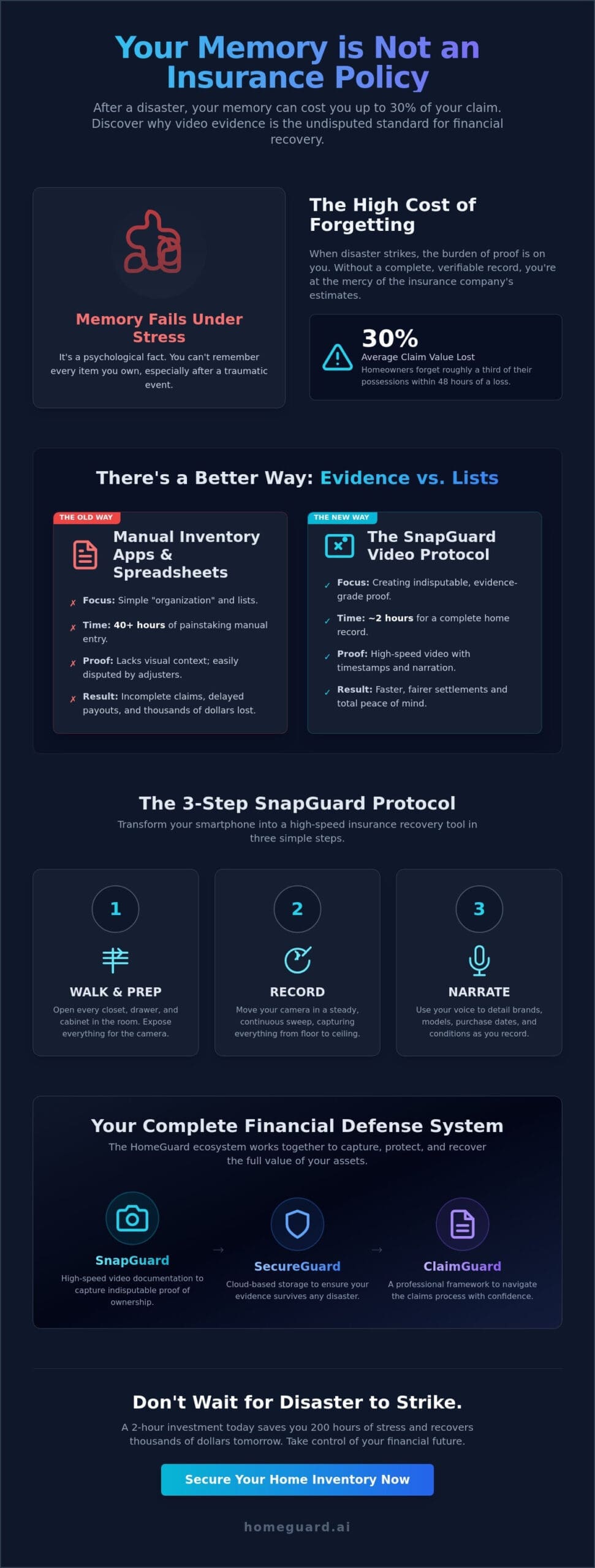
- Memory fails after a disaster, often costing homeowners 30% of their claim value; learn how to create evidence-grade documentation that adjusters cannot dispute.
- Master the SnapGuard protocol-walk, record, and narrate-to inventory your entire property in hours rather than weeks.
- Discover why a video-first home inventory app is the essential standard for 2026, providing the speed and visual proof required for high-stakes insurance recovery.
- Follow our specialized 2-hour Kansas City checklist to document high-value assets and hidden home improvements that are frequently overlooked during a loss.
- Secure your financial defense by integrating your video evidence with SecureGuard and the HomeGuard system for professional-grade asset management.
Why Most Home Inventory Apps Fail During a Real Claim
Most homeowners download a home inventory app with the goal of getting organized. They want to categorize their collections and tag their electronics. This is a fundamental mistake. Organization helps you find your property; evidence helps you recover your money. Standard apps focus on “tidiness” which is useless when your roof is gone. You need an evidence-grade inventory that withstands the scrutiny of a skeptical insurance adjuster. If your documentation lacks spatial context or high-resolution clarity, it is just a list. Lists do not win claims. Evidence does.
The psychological toll of a disaster creates a massive memory gap. Research indicates that homeowners forget roughly 30% of their assets within 48 hours of a major loss. You cannot claim what you cannot remember. This memory failure leads to “good enough” documentation, which results in thousands of dollars left on the table. Adjusters often reject low-quality photos or incomplete spreadsheets because they fail to define What Constitutes Household Goods in a way that proves ownership and condition. Without visual proof, you are at the mercy of the insurance company’s depreciation tables.
The Difference Between Organizing and Proving
Tidiness apps are designed for daily life, not for the aftermath of a fire. They help you find your socks but not your settlement. The burden of proof in Missouri and Kansas rests entirely on you. State laws require policyholders to provide a detailed, itemized list of losses. Most people realize too late that a spreadsheet is not proof. It is a claim. Visual context is the ultimate claim closer. High-speed video through SnapGuard provides the undeniable link between the item and your residence. It shows the brand, the condition, and the placement. This level of detail forces a faster, fairer payout. Don’t just organize your life; prove your loss.
The High Stakes of Kansas City Property Protection
The Kansas City metro area presents specific risks that demand professional-grade preparation. From the 2022 flash floods to the recurring threat of high-velocity tornadoes, local property is constantly under fire. In a total loss scenario, like the 2019 Linwood tornado, survivors who lacked digital backups faced years of financial recovery. A 2-hour investment in a home inventory app today saves you 200 hours of claim stress later. Adopt the Pragmatic Protector mindset. Your home is your largest investment. Treat your documentation like a financial defense strategy. Secure your evidence in SecureGuard to ensure it survives the storm. When the time comes to rebuild, ClaimGuard provides the professional framework to navigate the system with confidence. Preparation is the only logical choice. Visit HomeGuard to secure your future today.
The SnapGuard Protocol: Walk, Record, and Narrate
Traditional inventory methods are a recipe for financial loss. Writing down every item in a 2,500-square-foot home can take over 40 hours of manual labor. Most homeowners quit before they finish the first hallway. The SnapGuard protocol replaces this outdated labor with high-speed video. It’s the fastest path to a total record. You don’t need a weekend; you need an hour. By using a modern home inventory app, you shift from data entry to visual evidence.
The workflow follows a strict three-step sequence: Prep the room, record the sweep, and narrate the details. First, open every closet, drawer, and cabinet. Second, move your camera in a steady, continuous sweep of the space. Third, use your voice to bridge the gap between a picture and a price tag. This method captures thousands of data points in seconds. Video metadata provides the “digital fingerprint” required by adjusters. It includes embedded timestamps and GPS coordinates that serve as indisputable proof of possession and date.
Many people suffer from a mental block, thinking they must document the entire house in one marathon session. This leads to procrastination. Break the cycle by focusing on a single high-value zone. Use a professional Home Inventory Checklist to identify your priority areas. Once you finish one room, the momentum carries you to the next. Speed is your best defense against the chaos of a future claim.
Mastering the Narrative Technique
Your voice is the most powerful tool in the home inventory app process. As you record, state the brand names and approximate ages of high-ticket items. Mention “unseen” upgrades like custom cabinetry hardware or professional-grade wiring. If your property includes unique architectural wood elements or live-edge furniture, you can explore Custom Sawmilling through Bourbon Bigfoot Woodworking to better understand the replacement value of such specialty assets. For massive collections like power tools or a designer wardrobe, don’t list items individually. Pan the camera across the shelf and state the total item count. This verbal record establishes the replacement cost by defining the quality and condition of your assets before a loss occurs. It turns a simple video into a legal-grade document.
Technical Tips for Evidence-Grade Video
Lighting is the difference between a check and a denial. If a serial number isn’t legible, it doesn’t exist for the insurance company. Use your phone’s built-in light to illuminate dark corners and the back of electronics. When handling storage spaces, use the “5-second rule.” Open the drawer, scan the contents for five seconds, and move to the next. This ensures you capture the volume of goods without wasting storage space. Secure Cloud Storage is the non-negotiable final step to ensure your data survives the very disaster you’re preparing for. Once your recording is finished, sync it to SecureGuard to lock in your evidence. If you want to ensure your financial recovery is handled by experts, consider the full protection of HomeGuard.
Comparing the Best Home Inventory Apps of 2026
Choosing a home inventory app in 2026 isn’t about finding a digital list. It’s about securing your financial recovery before the storm hits. Most users evaluate tools based on three non-negotiable pillars: speed of entry, data security, and claim-readiness. In Kansas City, homeowners are abandoning generic spreadsheets. Manual entry is a trap. It’s slow, incomplete, and fails when you need it most. You need a system that works as fast as you do.
In 2026, AI has fundamentally changed the landscape. Generic apps use automatic item recognition to guess what you own. This sounds efficient, but it’s financially risky. If an AI misidentifies a high-end appliance as a base model, you lose money. Professional-grade tools prioritize manual narration over automated guesses. You walk, record, and narrate. This ensures every detail is captured exactly as it exists. Memory fails; video doesn’t. A security audit of your chosen platform is also vital. You must know if your data is stored in a decentralized, encrypted vault or on a vulnerable public cloud. For a deeper understanding of how to approach this process strategically, our guide on home inventory protection and asset recovery walks through the financial self-defense principles that separate a full payout from a partial settlement.
SnapGuard vs. Generic Organizers
Efficiency is the difference between a completed inventory and a half-finished project. For a standard 2,500 sq ft Kansas City home, generic organizers take 12 to 15 hours of manual typing. SnapGuard reduces this commitment to under 90 minutes. You simply move through your rooms. If the power fails or the 5G network drops, the app continues to work. Offline capability is a requirement, not a luxury. Once finished, you can export a professional PDF report. This document is designed to be handed directly to a ClaimGuard specialist, streamlining your recovery process without the usual back-and-forth with adjusters.
The Financial Risk of “Free” Apps
“Free” is often the most expensive price you can pay for a home inventory app. Many free apps monetize your personal property data by selling it to third-party marketers. Your privacy is the product. Even worse is the risk of app abandonment. If a developer stops updating a free tool, your data could vanish within 5 years. A professional system like SecureGuard ensures your data is encrypted and stored where only you can access it. Choosing a one-time fee for lifetime access is the pragmatic choice. It guarantees that your inventory will be there when you need to prove what you owned. Visit HomeGuard to secure your assets today. Protect what you own. Recover what you lose.
The 2-Hour KC Home Inventory Checklist
Memory fails during a crisis. You won’t remember the specific brand of your power tools or the installation date of your HVAC unit when you’re staring at a pile of debris. Efficiency is your best defense. Use a high-speed home inventory app to document your entire property in less than two hours. Start with a “High-Value” sweep. Walk through your home and narrate the specifics of jewelry, electronics, and firearms. These items require proof of possession for specific insurance policy riders. Without a video record, these are the first items adjusters dispute during a claim.
Don’t overlook the “Hidden Assets” common in Kansas City homes. Record your attic insulation levels and the serial number on your furnace. If you’ve invested in basement waterproofing or sump pump upgrades, document them now. These structural improvements add significant value to your home’s replacement cost but are invisible once a disaster occurs. In the kitchen, don’t just film the appliances. Open every drawer. A fully stocked pantry and a collection of professional-grade cookware can represent $5,000 in lost assets. These small items add up to thousands in a claim; don’t leave that money on the table. Effective home inventory protection means capturing these hidden assets before a disaster makes them impossible to recall.
Finish your documentation in the garage and exterior. Document your riding mower, patio sets, and any detached outdoor structures. These are frequently omitted from claims because owners focus only on the main residence. A quick video scan ensures every asset is accounted for before the chaos of a disaster strikes. To maximize your claim readiness, pairing your video documentation with a structured digital home inventory spreadsheet gives adjusters the itemized paper trail they need alongside your visual evidence. For a comprehensive room-by-room breakdown of every asset category you need to capture, our household items list for insurance claims provides the structured recovery guide that ensures no valuable possession is left undocumented.
Room-by-Room Strategy for Speed
The Kitchen: Focus on built-in appliances and “hidden” cabinet contents. Open the pantry and narrate the presence of specialty items like espresso machines or stand mixers. These are high-cost replacements that are easy to forget.
The Living Room: Document your tech, furniture, and custom window treatments. Custom blinds for a standard suburban home can cost $300 per window; documenting ten windows secures $3,000 in your recovery fund.
The Master Suite: Handling high-end wardrobes and linens efficiently is key. Pan the camera across your closet and narrate designer labels or high-quality bedding. It’s about proving your standard of living to the insurance company.
Critical Documents to Digitize
Paper records are vulnerable to fire and flood. Digital copies of your insurance policies and professional appraisals must be stored in the SecureGuard vault immediately. This ensures your data remains accessible even if your physical devices are destroyed. Create a dedicated “Proof of Loss” folder within your home inventory app to organize video files for instant retrieval. Digital copies must be stored in a cloud environment outside your physical home to prevent total data loss during a localized disaster. Preparation is the only logical choice for financial self-defense.
Secure Your Future with HomeGuard and SnapGuard
The HomeGuard system exists because memory is a fragile defense against total loss. In 2018, our founder stood on a sidewalk in Kansas City watching a lifetime of possessions turn into smoke. The subsequent insurance battle proved that without documented evidence, your policy is just a piece of paper. You can’t remember every serial number or brand name when you’re in shock. We built this home inventory app to ensure no other family has to experience that financial erasure. It’s about turning a tragedy into a manageable recovery.
Efficiency is our priority. We’ve integrated SnapGuard video technology directly with SecureGuard digital asset management. This creates a seamless pipeline from your living room to a secure cloud. You record the video, and the system organizes the data. It’s a professional-grade solution for a high-stakes problem. If you ever need to file a claim, ClaimGuard provides the structured proof adjusters require to pay what you’re actually owed. No more guessing. No more lost money.
Our “One-Day” promise is simple. You don’t need weeks of cataloging. You need one afternoon before the next tornado or ice storm hits. Walk through your home. Record your rooms. Narrate the details. By sunset, your entire estate is protected. Don’t wait for the “After” to realize you should’ve secured the “Before.” Preparation is your only leverage when dealing with insurance companies. It’s the difference between a full payout and a partial settlement.
The HomeGuard Lifetime Advantage
Most software companies want to rent you your own data. We don’t believe in monthly subscriptions for your peace of mind. You buy the system once, and you own your protection forever. Our tools are specifically calibrated for Kansas City risks, from basement flooding to hail damage. When you call for help, you talk to people who’ve survived total losses. We provide the pragmatic clarity you need to navigate the chaos of insurance claims without the stress.
Start Your Inventory Today
You can get immediate access to the high-speed documentation tools within our home inventory app. If you prefer a hybrid approach, we provide downloadable templates for those who want a digital home inventory spreadsheet alongside their video files. The goal is documentation, not perfection. Start now so you don’t have to remember later. Your future self will thank you for the foresight.
Secure Your Financial Recovery Before the Crisis Hits
Your memory will fail you after a disaster. National fire statistics show that a residential fire occurs every 93 seconds in the United States. When the smoke clears, you can’t rely on a blurry mental list to recover your assets. Most legacy tools fail because they’re too slow or rely on static photos that lack context. SnapGuard changes the math. By using the SnapGuard Protocol, you can complete the full 2-hour KC checklist in one afternoon. You get evidence-grade video documentation that insurance adjusters can’t ignore. This system was founded by a house fire survivor who learned that “good enough” documentation leads to lost money. It’s the most efficient home inventory app for 2026 because it requires no monthly subscription fees. You don’t have to pay a recurring tax to protect what you already own. Stop guessing and start proving your claim with a professional-grade record. Secure your future with the experts at HomeGuard.
Download SnapGuard and Protect Your Home Today
Frequently Asked Questions
Is a video inventory enough for my insurance company to pay out?
A comprehensive video inventory is often the most powerful tool for securing a full claim payout. While policies vary, a clear video walkthrough provides undeniable visual proof of possession and condition that written lists lack. If a disaster occurs, you need to prove your loss immediately. Use SnapGuard to narrate specific details like brand names and purchase dates. This documentation prevents the 25 percent loss in claim value often seen with undocumented assets.
What is the best home inventory app for seniors who are not tech-savvy?
The best home inventory app for seniors focuses on ease of use over complex data entry. SnapGuard eliminates the need for spreadsheets or manual typing. Users simply walk through their home and narrate what they see. This point and record method ensures that 100 percent of the home is documented without the frustration of learning complicated software. It turns a week-long project into a 20 minute walk.
How often should I update my home inventory app record?
You should update your inventory record at least once every 12 months or immediately after acquiring high-value assets. Major holidays or birthdays often introduce new electronics or jewelry into the household. A quick 5 minute update ensures your coverage matches your current lifestyle. Failing to update your records results in 15 percent of homeowners being underinsured during a total loss event. Keep your digital file current to ensure full financial recovery.
Can I use a home inventory app for my small business equipment too?
Yes, you can and should use a home inventory app to document small business equipment and home office assets. Business owners often overlook the 40 percent of assets kept in home offices during insurance assessments. Documenting computers, specialized tools, and inventory through SnapGuard creates a professional asset log. This documentation is vital for both insurance claims and tax depreciation records. Protect your livelihood by proving what you own before a crisis occurs. If you are also looking to enhance your professional standing, check out Rezumi to ensure your resume is perfectly optimized for modern career opportunities.
Where is the safest place to store my digital inventory files?
The safest place to store your inventory files is in a dedicated, encrypted cloud environment like SecureGuard. Physical hard drives and local phone storage are vulnerable to the same fire or water damage that threatens your home. Storing data offsite ensures it remains accessible even if your hardware is destroyed. Data experts recommend the 3-2-1 backup rule, which includes at least one offsite digital copy to guarantee 99.9 percent data availability during a claim.
What happens if I lose my phone and my inventory was on it?
If you lose your phone, your inventory remains safe as long as it was synced to a cloud-based service. SnapGuard automatically backs up your recordings to a secure server. You can access your files from any device by logging into your account at homeguard.ai. Your documentation is independent of your hardware. This redundancy ensures that a lost device doesn’t result in a lost insurance settlement.
Do I need to list every single fork and spoon in my house?
You don’t need to list every individual utensil, but you must document the total volume and quality of your kitchen assets. Instead of single items, record a slow pan of open drawers and cabinets while narrating the brand or set size. For example, mention a 12 piece set of Henckels cutlery. This method captures the 200 or more items in a standard kitchen in under 3 minutes. Grouping items ensures you receive a fair bulk replacement value. For a complete breakdown of how to categorize and document every room, our household items list for insurance claims gives you the room-by-room framework to maximize your payout.
How much does a professional home inventory service cost in Kansas City?
Professional home inventory services in the Kansas City area typically follow national industry averages for asset documentation. According to 2024 industry reports, these services often range from 400 dollars to over 1,000 dollars depending on the square footage of the property. Using a DIY tool like SnapGuard provides the same level of protection at a fraction of the cost. If you face a complex claim later, ClaimGuard can assist with the professional recovery process.