
Most homeowners assume a list of their belongings is enough to satisfy an insurance adjuster, but the reality is far more brutal. If you cannot provide a sworn proof of loss with professional-grade documentation, you’re effectively leaving thousands of dollars on the table. In 2026, a basic digital home inventory spreadsheet stored on a local hard drive is a liability. If your documentation is lost in the same disaster it was meant to record, your financial recovery vanishes instantly.
We know that cataloging every item in your home feels like an impossible task. You’re likely overwhelmed by the volume of your possessions and terrified that insurance will underpay your claim. This guide changes the equation. You’ll download the ultimate digital home inventory spreadsheet from HomeGuard and learn the professional methods used to win claims. We’ll show you how to use SnapGuard to document assets in hours and SecureGuard to keep that data safe in the cloud. We also cover how ClaimGuard principles ensure you’re never forgotten by the system. It’s time to stop guessing and start proving what you own.
Key Takeaways
- Stop relying on memory and download our digital home inventory spreadsheet to build a professional asset list that forces insurance companies to pay.
- Adopt the Walk-Record-Narrate method to document your entire property in a single afternoon, ensuring zero items are missed or forgotten.
- Move your documentation to a secure cloud vault with SecureGuard so your proof survives the disaster it documents.
- Learn the professional documentation standards required to turn a basic house inventory list into a legally binding proof of loss.
- Shift from disaster anxiety to financial control by using HomeGuard to secure your home’s value before a loss occurs.
Why Kansas City Homeowners Need a Digital Home Inventory Spreadsheet in 2026
Kansas City residents face a unique set of environmental threats. From the sudden devastation of an EF3 tornado to the silent threat of a residential fire, your assets are never entirely safe. A digital home inventory spreadsheet is your first line of defense. It isn’t just a list; it is a structured digital record of your personal property designed specifically for insurance verification. Without it, you’re asking an insurance adjuster to take your word for it. In the world of property insurance, word-of-mouth equals lost money.
The financial reality is stark. Most homeowners are underinsured because they can’t prove what they owned. A single missed room can cost you $15,000 in unclaimed assets. Paper lists are a relic of the past. If your house burns, your paper list burns with it. If a storm hits, physical files are scattered. A digital format stored via SecureGuard ensures your data survives the disaster. It’s the difference between a total financial wipeout and a successful recovery.
The ‘Memory Fails’ Reality
Memory fails. It’s a biological fact. After the trauma of a major loss, your brain prioritizes survival, not the brand name of your toaster or the purchase date of your lawnmower. You won’t remember the contents of your junk drawer or the expensive tools in your garage when you’re standing in the wreckage. Think of a digital home inventory spreadsheet as an external hard drive for your belongings. It stores the facts so you don’t have to. You can transition from the chaos of a total loss to the control of a structured home inventory by acting while things are calm. Don’t wait for the sirens to start before you begin documenting.
Insurance Requirements for 2026
In 2026, insurance adjusters expect professional-grade documentation. They aren’t looking for vague descriptions. They want to see the difference between “Replacement Cost” and “Actual Cash Value” clearly defined in your records. Your spreadsheet should establish the baseline value for every asset, including purchase dates and original prices. This level of detail doesn’t just increase your potential payout; it speeds up the entire Kansas City claims process. When you provide a claim-ready file through ClaimGuard, you move to the front of the line. You give the adjuster exactly what they need to say “yes” to your claim. Preparation is the only logical choice for the modern homeowner.
At HomeGuard, we’ve seen how the lack of a proper system ruins lives. We’ve watched families struggle to recall their possessions while dealing with the grief of a lost home. Our mission is to prevent that. By using tools like SnapGuard, you can build a comprehensive record that stands up to scrutiny. Protect what you own. Recover what you lose. It starts with a single, organized file.
Essential Columns for a Claim-Ready Home Inventory Template
A list of your belongings won’t survive a professional audit if it lacks the right data structure. If your digital home inventory spreadsheet looks like a grocery list, you’re going to lose money. Insurance adjusters require specific data points to approve a payout. They don’t want a vague entry like “TV in the living room.” They want “Samsung 75-inch QLED, Model QN90A, Serial #123456.” To win your claim, your template must include these four foundational pillars:
- Item Name and Room Location: This is your foundation. Grouping items by room helps adjusters visualize the loss and cross-reference with your home’s floor plan.
- Purchase Date and Price: This establishes the baseline value. If you can’t prove what you paid, the adjuster will likely default to the lowest market price they can find.
- Serial Numbers and Model Info: Critical for electronics and appliances. This prevents the “generic item” markdown where a high-end asset is valued as a budget model.
- Photo/Video Links: This is the most important column in 2026. It serves as the “proof” that the item actually existed in your home before the disaster.
High-Value Asset Documentation
Standard insurance policies often have sub-limits for specific categories. You need specialized columns for jewelry, fine art, and rare collectibles to ensure you don’t exceed these caps without realizing it. Include fields for appraisal dates and direct links to digital certificates. In 2026, insurance standards define a high-value asset as any single item with a replacement cost exceeding $2,500 or any item requiring a scheduled rider. Proper home inventory protection requires these appraisals to be updated every three years to reflect current market fluctuations.
The ‘Evidence’ Column
An entry without evidence is just a wish. Every row in your digital home inventory spreadsheet must link to a visual file. This is where you integrate your data with SnapGuard video evidence. By hosting your videos and photos in a cloud-accessible column, you provide the adjuster with immediate, undeniable proof. As noted in the Insurance Information Institute’s home inventory guide, keeping these records off-site is a critical step in disaster preparedness. Digital organization of receipts and warranty documents further solidifies your claim. If you want to ensure your recovery is fast and full, you can start your professional inventory today with a system designed for results.
Manual Excel vs. Specialized Digital Inventory Systems
Many homeowners believe a basic Excel file is enough to protect their assets. It is a dangerous assumption. While a standard spreadsheet is familiar, it is a static tool that lacks the resilience required for true disaster recovery. If your digital home inventory spreadsheet lives only on a laptop sitting on your kitchen island, it will vanish in the same fire or flood it was meant to document. Static files are silent failures. You need a system that survives the chaos, not one that contributes to it.
Consider the evacuation scenario. If a storm hits Kansas City, you might find yourself at an emergency shelter with nothing but your smartphone. Can you access your local Excel file? Can you show an adjuster your high-value assets while standing in a parking lot? If the answer is no, your documentation is a liability. The HomeGuard advantage lies in moving from local vulnerability to cloud-based security. By pairing your digital home inventory spreadsheet with SecureGuard, you ensure your data is indestructible and accessible from any device, anywhere, at any time.
The Vulnerability of Local Files
“Saved to Desktop” is a death sentence for your data. Local storage offers zero protection against hardware failure, theft, or natural disasters. In 2026, the average cost of professional inventory management software is approximately $150 per month; a price many pay because they fear losing their records. You don’t need expensive corporate software. You need a house inventory app strategy that supplements your spreadsheet with real-time cloud syncing. Acting before the disaster ensures your proof is waiting for you in the vault. Acting after is impossible.
Feature Comparison Table
Understanding the gap between a basic list and a professional recovery system is vital for your financial self-defense. The following table highlights why a standard file falls short of modern insurance requirements.
| Metric | Static Spreadsheet | Generic App | HomeGuard System |
|---|---|---|---|
| Ease of Use | Manual / High Effort | Variable | Fast / Guided |
| Proof of Loss Ready | No | Partial | Yes |
| Security | Low (Local) | Medium | High (Vaulted) |
| Cloud Access | None | Standard | Multi-Device |
| Claim Support | None | Automated | Expert Guided |
By integrating ClaimGuard principles into your documentation process, you move beyond simple organization. You’re building a legal fortress around your assets. Don’t settle for a list that can be deleted with a single coffee spill. Secure your future with a system designed for the reality of 2026.
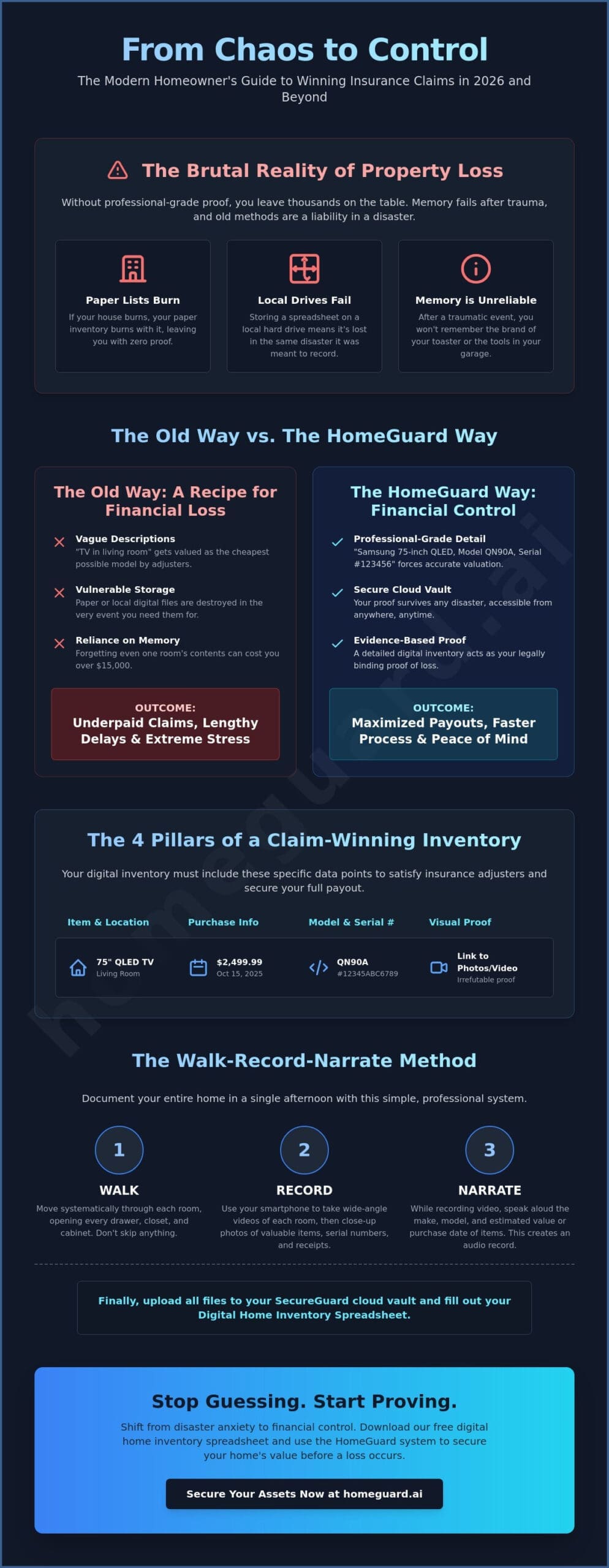
The Walk-Record-Narrate Method: Completing Your Inventory Fast
A manual inventory takes days. The Walk-Record-Narrate method takes hours. This systematic approach strips away the complexity of the digital home inventory spreadsheet by focusing on high-speed visual evidence. You don’t need to be an appraiser to protect your assets. You just need a phone and a plan. Preparation is your first step. Clear the clutter from your surfaces. Open every closet door and pull out every drawer before you start. If you can’t see it, you can’t prove you owned it.
The method is simple: walk, record, and narrate. You move through your home room-by-room while using SnapGuard to capture continuous video. Your voice is your most powerful tool for proving value. As you record, speak clearly. Identify brands, mention purchase years, and point out specific features. This turns a generic video into a professional-grade asset record. It bridges the gap between a simple list and a claim-ready document. You are creating the “before” proof that makes the “after” recovery possible.
Step-by-Step Room Execution
Start with high-risk, high-value areas like the kitchen, living room, and garage. These rooms contain the bulk of your home’s financial value, including vehicles where specialized security or audio systems, such as those provided by Safe & Sound Mobile, should be documented. When handling bulk items like clothing or books in your digital home inventory spreadsheet, don’t list every individual item. Instead, record the entire closet or shelf and narrate the approximate count and average brand quality. Aim for the 30-minute room challenge. Perfection is the enemy of completion. You can refine the details later; your priority today is capturing the proof before a disaster strikes. Efficiency is your best defense against being overwhelmed.
Capturing the Invisible Assets
Most lost money occurs in the places you forget to look. Document inside every cabinet, behind large appliances, and deep within storage bins. Narrating specific features like “solid oak construction” or “stainless steel finish” significantly increases an item’s replacement cost in the eyes of an adjuster. In 2026, many insurance carriers require narrated video proof to verify the specific condition and premium features of high-value assets during a claim dispute. This level of detail ensures you aren’t underpaid for high-end possessions. If you’re ready to secure your financial future, download the HomeGuard recovery toolkit and start your walk today.
Securing Your Future: Beyond the Spreadsheet with HomeGuard
A digital home inventory spreadsheet is a powerful tool, but it is not a complete disaster plan. It is a blueprint, not the building. If you stop at the data entry phase, you’re only halfway to safety. True protection requires a system that is indestructible and immediately accessible when the worst happens. In Kansas City, where severe weather can displace families in minutes, having your records in a physical drawer or on a single laptop is a gamble you will eventually lose. You need a vault that survives the storm.
This is where SecureGuard becomes essential. It acts as your professional-grade digital vault. It doesn’t just store files; it secures your financial recovery. When you transition your manual data into the HomeGuard Complete system, you move from a vulnerable file to an encrypted, cloud-based fortress. You ensure that no matter what happens to your physical property, your proof remains intact. It’s the difference between a rejected claim and a full payout.
Integrating SecureGuard and SnapGuard
Your digital home inventory spreadsheet should be the central hub that links to your visual evidence. By using SecureGuard, you enable automatic backups of your entire inventory. You can link specific video files from SnapGuard directly to room-specific folders. This organization allows for instant retrieval during a high-stress claim. More importantly, it ensures your family has emergency access. If you are unavailable, your spouse or adult children must be able to retrieve this documentation to start the recovery process immediately. Access equals speed, and speed equals money.
Winning the Claim with ClaimGuard
Presentation is everything in an insurance dispute. When you present an adjuster with a professional, narrated, and vaulted inventory, the psychological dynamic shifts. You are no longer a victim trying to remember what you lost. You are a prepared homeowner with undeniable proof. This is the core philosophy of ClaimGuard. It uses your structured data to fight for every dollar of your replacement cost. It forces the insurance company to treat your claim with the professional respect it deserves. You provide the evidence; they provide the check.
Is your inventory claim-ready for a Kansas City emergency? Before the next storm season, verify this final checklist:
- Is your spreadsheet stored in a cloud vault like SecureGuard?
- Does every high-value item have a corresponding video clip from SnapGuard?
- Have you updated your appraisals for 2026 market values?
- Does a trusted family member have the access credentials?
Preparation is the only logical choice for the modern homeowner. Don’t let your hard work vanish in a disaster. Protect your home today at www.homeguard.ai and ensure you recover everything you lose.
Take Control of Your Financial Recovery
Disaster is unpredictable, but your recovery shouldn’t be. You now have the blueprint for a claim-ready digital home inventory spreadsheet. You know that memory fails during a crisis. You understand that a local file is a liability. By adopting the Walk-Record-Narrate method, you move from the chaos of a lost home to the certainty of a proven asset list—a transition toward efficiency that mirrors how modern teams use humae.io to manage their workforce with AI-powered precision. This isn’t just theory; it’s a system built by Kansas City-based disaster recovery experts and founded by a residential fire survivor who lived through the failure of undocumented claims.
Don’t leave your financial future to chance. Use our proprietary SnapGuard technology to record your proof today. Secure that data in the SecureGuard vault so it’s ready when ClaimGuard needs to fight for your full policy value. The peace of mind that comes from being prepared is the only true security. Secure your assets and get the HomeGuard Complete system at www.homeguard.ai. You’ve worked too hard to build your life to let it disappear without a trace. Start documenting now.
Frequently Asked Questions
Is a digital home inventory spreadsheet better than a mobile app?
A spreadsheet offers superior data control and long term accessibility compared to most proprietary apps. While mobile apps are convenient for quick captures, they often lock your data into a specific format that might not exist in five years. Using a digital home inventory spreadsheet ensures your records remain readable by any computer during a claim. For the best results, use a spreadsheet to manage your data and SnapGuard to capture the high speed video evidence required for verification.
What are the most common items people forget to include in their home inventory?
Homeowners consistently overlook “invisible” assets like window treatments, light fixtures, and the contents of their pantry or medicine cabinet. A 2025 insurance industry report found that the average claimant misses $12,000 in personal property by failing to document these smaller items. Don’t just list the big screen TV. Record your linens, holiday decorations, and the hand tools stored in your garage. Every item you forget is money you won’t recover.
How often should I update my digital home inventory spreadsheet in 2026?
You should review your digital home inventory spreadsheet at least twice per year or after any single purchase exceeding $500. Major shopping holidays or tax season are perfect triggers for this update. In 2026, the rapid price fluctuations for electronics and home goods mean that an inventory older than 12 months is likely inaccurate. Keeping your records current ensures your policy limits actually match the replacement cost of your belongings.
Will my insurance company accept an Excel spreadsheet as proof of loss?
Most carriers accept Excel files, but they prioritize the evidence that supports each entry. A spreadsheet is merely a list; a “sworn proof of loss” requires verifiable proof. To ensure your file stands up to an adjuster’s scrutiny, link every row to a vaulted video file in SecureGuard. This turns a simple document into a professional record that is difficult for an insurance company to dispute or underpay.
Where is the safest place to store my home inventory files?
The only safe location is an encrypted cloud vault that exists outside your local geographic area. Storing your inventory on a thumb drive or a home computer is a 100% risk if a fire or tornado destroys the property. By using SecureGuard, you ensure your documentation is indestructible and accessible from any smartphone or tablet. This allows you to start your claim from an evacuation center while your neighbors are still searching for their paperwork.
Do I need to include receipts for every item in my spreadsheet?
You don’t need a receipt for every fork and spoon, but you must have them for any asset valued over $2,500. For everyday items, a narrated video that shows the brand and condition serves as sufficient secondary proof. If you’ve lost the original receipt, a photo of the serial number is the next best thing. Documenting these details prevents adjusters from defaulting to the lowest possible “Actual Cash Value” for your high end possessions.
Can I use a digital home inventory spreadsheet for my Kansas City rental property?
Yes, and it’s a critical step for protecting your security deposit and personal property. Renters in Kansas City often forget that a landlord’s insurance only covers the building structure, not the tenant’s belongings. A detailed inventory ensures your renters insurance policy pays out the full value for your furniture and electronics. It also provides the “before” proof needed if a landlord tries to claim you damaged the unit during your lease.
How do I calculate the replacement cost for older items in my inventory?
Calculate the cost to buy the same item brand new at 2026 market prices, not what you paid for it five years ago. Check current retail listings for a comparable model with similar features to establish a baseline. For rare or high value items, the ClaimGuard methodology recommends using professional appraisals updated every 36 months. This ensures your coverage is high enough to actually replace your lifestyle after a total loss.
Ready to start your professional documentation? Visit HomeGuard today to secure your assets before the next disaster strikes.